Each section of the 4logist system uses a data table. The table displays information about all entities that are located in the corresponding section of the system. For example, the Orders section displays an order table that contains information about all orders entered in the system.
A table is a structured data set where each information unit is displayed in a separate column. This approach allows you to quickly navigate through data, sort it, analyze it, and work with orders in your day-to-day operations.
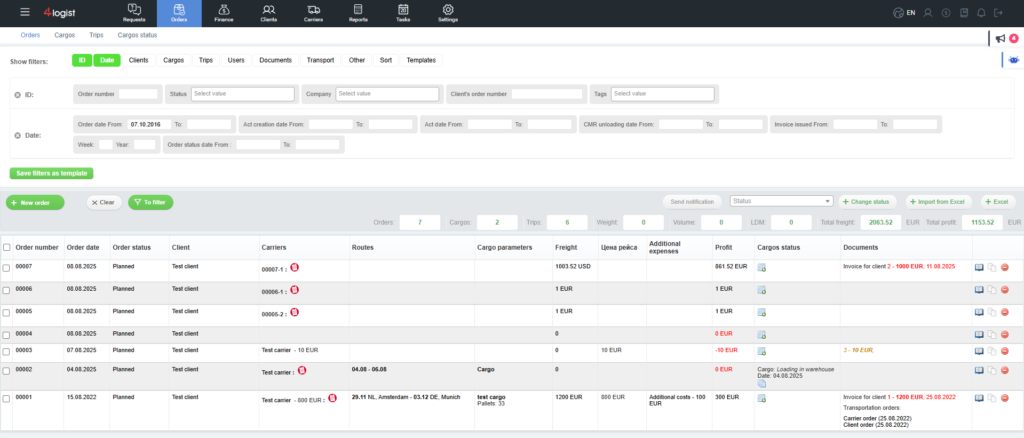
Setting up a table
The table structure (set of displayed columns) can be changed for business processes of a particular company.
You can change the table in two cases::
- At the stage of system implementation. As part of the implementation, the implementation specialist can set up a table for your tasks. This service is included in the implementation process and is not charged separately.
- After the implementation is completed. In this case, the configuration is carried out at the request of the client via a request to technical support and is a paid service. This service is not included in regular maintenance.
It is important to keep in mind that if the required column is not included in the list, then it is not provided by the current version of the system. However, it can only be added in the format of individual improvements to the system. Individual customization differs from customizations: it requires development, is evaluated separately, and costs more than the standard table setup.
As part of setting up a table, you can:
– add new columns from the list provided below–
– delete (hide) columns that are not used in the work.
Table in the system and loading the report in Excel
Separately, we will note that the order table that you see in the 4Logist interface and the table that you upload to Excel are different entities.
They have different tasks and different structures:
– the table in the system is intended for operational work of users–
– loading the Excel report is used for analytics, reporting and data transfer to external systems.
By default, the structure of these tables does not match. They can be converted to a single type only at the individual request of the client to the implementation or technical support department. Without such a query, differences between tables are normal and expected behavior of the system.
This article focuses on the order table that is displayed in 4Logist.
Available order table columns
Below is a list of columns that can be added to the order table. If the column is in this list, it is available for customization without development.
| № | imme | What is shown in the column |
| 1 | Order Number | |
| 2 | Custom field, Type text | |
| 3 | Custom field, Type text 2 | |
| 4 | Order creation date | |
| 5 | status | Order Status |
| 6 | client | Default client and Contract |
| 7 | Carrier | Flight name, Price, and vehicle number |
| 8 | Flight number | |
| 9 | Route from cargo | Loading / unloading dates, city, country |
| 10 | Vehicle number | |
| 11 | Cargo Parameters | |
| 12 | Order freight | |
| 13 | Additional services | Name and amount of finn. operations |
| 14 | Order profit | |
| 15 | List of cargo statuses | |
| 16 | Documents (display option) | Part is hidden (you need to click Show all) |
| 17 | Custom field, date type | |
| 18 | Dakota field, Type date 1 | |
| 19 | Custom field, Type date 2 | |
| 20 | Action Bar | |
| 21 | Operator (display option) | Flight name, Price, and vehicle number |
| 22 | Documents (display option) | Complete list without hidden rows |
| 23 | Route (display option) | Dates, countries, cities, add. services |
| 24 | Documents (display option) | Invoices, acts, and invoices |
| 25 | Cargo Attributes | |
| 26 | Recipient (display option) | Place \ company( unloading), unloading address, Contact person and phone number when loading |
| 27 | Sender (display option) | Location \ company (upload), address when uploading, Contact person and phone number when uploading |
| 29 | Date of loading from the cargo | |
| 31 | Operator (display option) | Just the name of the carrier from the flight |
| 32 | vehicle number | Car number from the flight |
| 33 | Documents (display option) | Only the client’s account |
| 34 | invoices | |
| 35 | Received invoices | |
| 36 | Upload Location | Country, city |
| 37 | Place of unloading | Country, city |
| 38 | Operator (display option) | Name, Flight price, vehicle number |
| 39 | Operator (display option) | Flight name and Price |
| 40 | Creation date (display parameter) | Creation date and number of days from the order creation date |
| 42 | Documents (display option) | Invoices, acts , and requests-with grouping |
| 43 | Route (display option) | Dates, countries, cities |
| 44 | Sending status (display option) | Cargo name, status, date, user |
| 46 | Documents (display option) | All documents with groups |
| 47 | Upload dates (display option) | All dates (with ranges) |
| 48 | Unloading dates (display option) | All dates (with ranges) |
| 49 | Route (display option) | Date, city for loading, unloading, unloading city. Flight cost, additional services with prices |
| 50 | Cargo cost | Cargo cost |
| 51 | Cargo status | All dates and statuses |
| 53 | Client (display option) | Client’s name |
| 54 | Expenses | Amount of expenses |
| 55 | Order creation date | |
| 56 | Documents (display option) | List without headers |
| 57 | cargo | |
| 58 | Order Number | |
| 59 | Download location (display option) | Loading a city |
| 60 | Cargo Parameters | |
| 61 | sender | Place ( Company) – Download |
| 62 | recipient | Place (company) – unloading |
| 63 | Seller (display option) | Manager and Additional Manager |
| 64 | Status (display option) | Order Status |
| 65 | Place for unloading (display option) | City of unloading |
| 66 | Additional cargo information | |
| 67 | Carrier (display option) | Imme carrier, vehicle number, imme and driver number |
| 68 | Profit with VAT | |
| 69 | Contact person of the carrier | |
| 70 | Flight price | |
| 71 | Carrier’s route | |
| 72 | Carrier with driver | |
| 73 | Client and contract | |
| 74 | Comments | |
| 75 | Company (order executor) | |
| 76 | Cargo name | |
| 77 | the shipper | Location, Country, City, address |
| 78 | consignee | Location, Country, City, address |
| 79 | Cost of consolidation | |
| 81 | Customer’s contact person in the order | |
| 82 | Customer’s contact person in the order (display option) | Theyhave my last name and email address |
| 83 | Amount of expenses | |
| 84 | Date of customs declaration | |
| 86 | Documents (display option) | Only invoices and certificates |
| 87 | CMR Upload Date | |
| 88 | Documents (display option) | All documents with names and grouping by type (most complete information), hidden list |
| 89 | Documents (display option) | Documents with partial grouping: invoices, applications |
| 90 | Account | Only the issued invoice |
| 91 | Upload date (all) | Download dates from all flights except consolidation |
| 92 | Upload dates (display option) | Start dates from all flight orders with a range and time. |
| 93 | Upload dates (multiple) | Start dates from all flight orders with ranges, but no time. |
| 94 | Upload Location | Country, City, address |
| 95 | Order route | Route and dates of loading and unloading from cargo |
| 96 | Recipient’s Information | Date of unloading from the cargo, place \ company country, city, unloading address Contact person and phone number |
| 97 | Route address | Loading address – unloading address |
| 98 | Route address (city) | City on upload, address during upload-city, unloading address |
| 99 | Route address (country, city) | Country (designation), city on loading, loading address-country, unloading city, unloading address |
| 100 | Extended Route | Upload date, country (designation), zip code ( upload), city when uploading-upload date, country, zip code, city |
| 101 | Information about the sender | Date of loading from the cargo location \ company (loading) country, city on upload, address Contact person and phone number on upload |
| 102 | Unloading date (display option) | Date of unloading from the first flight (range) |
| 103 | Unloading date (display option) | Date of unloading from the cargo |
| 104 | Unloading date (display option) | Unloading dates from all flights-no range |
| 105 | Unloading dates (several) | Unloading dates from all flights (range) |
| 106 | Place of unloading | Country, unloading city, unloading address |
| 107 | Unloading date (display option) | Date of unloading from the flight |
| 108 | user | All employees on request |
To add a column, contact technical support at help@4logist.com
the service costs at least 1 hour of development (set the cost according to your contract), regardless of the number of columns, and is paid in advance.
Was this helpful?
1 / 0