This article will help you change your login password or restore access if you forget it.
Method 1: Self-recovery via email
This method is best if you can’t log in.
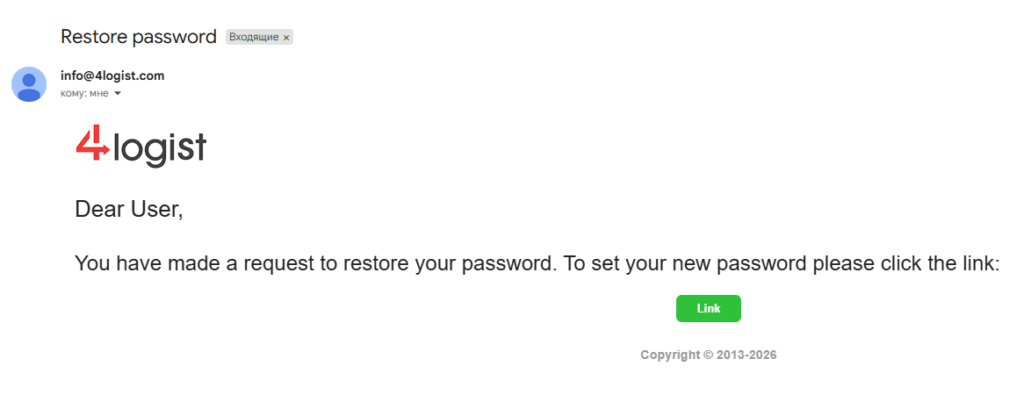
- On the main database login page, click Restore Password. and enter the email address specified in your profile.
- You will receive an email with a link to reset your password.
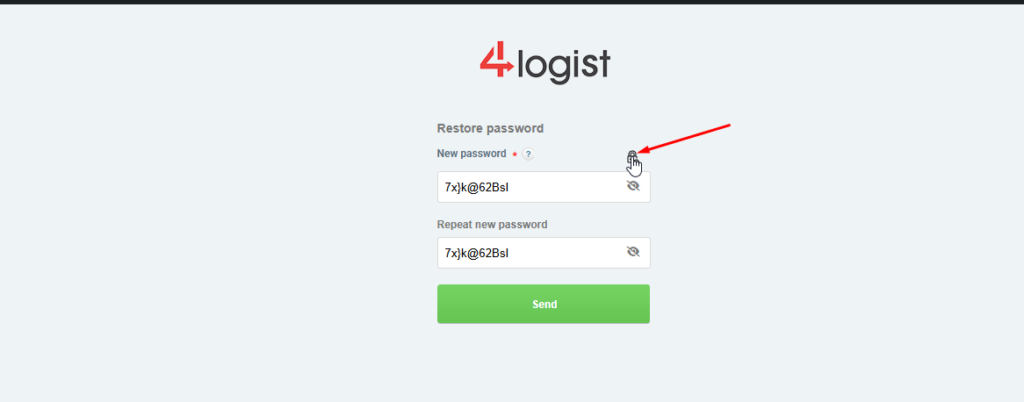
- Follow the link and enter a new password that meets the security requirements.
- After saving, go back to the login page and log in.



Important rules and tips
- Password requirements: at least 8 characters, must contain numbers, as well as uppercase and lowercaseletters.
- Copying: we do not recommend copying the password from another source. If you still decide to copy it, make sure that there are no accidentally copied spaces before or after the password. . The system considers the space as a full-fledged character, and there will be an error when logging in.
- Security: We recommend that you write down your created password in a safe place.
We recommend using the password generation feature built into this form:
Method 2: Through your company’s administrator
If you don’t have access to Yandex.Mail, contact an employee of your company who has permission to edit user data.
Admin Actions:
- Go to installation → organization → employees.
- Find the profile of the desired employee and proceed to editing.
- Select the change password checkbox, enter a new combination, and click Save.
- Send the new password to the employee via instant messengers or othercommunication channels.
Are there any difficulties? If none of these methods worked, please contact our pidtrimka technical support team:help@4logist.com . we will help you quickly resolve access issues.
Was this helpful?
0 / 0