The automatic document creation feature helps reduce routine work when processing orders. Once configured, the system can automatically create an invoice or a service completion certificate when an order status changes.
This feature is available on all subscription plans.
Available Documents
Currently, the following documents can be created automatically:
- Invoice
- Service Completion Certificate
Setting Up Automatic Document Creation
Go to:
Settings → System → Events → Changing Order Status
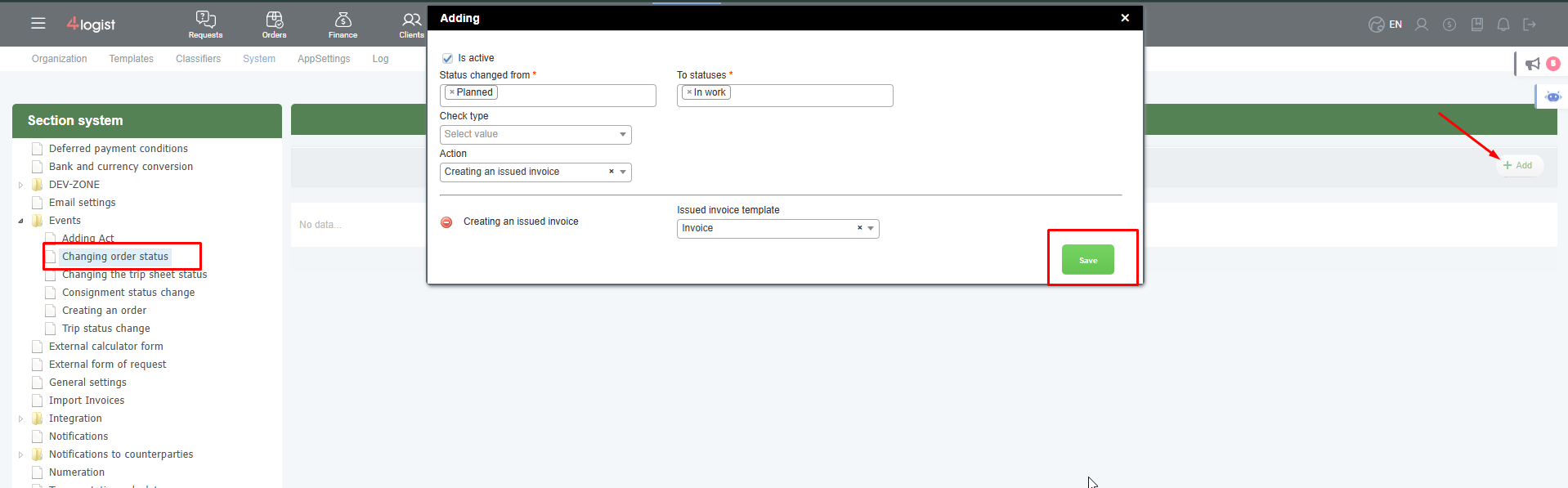
Click Add Condition and configure the following settings:
- Select the source status.
- Select the target status.
- In the Action field, choose:
- Create Invoice
- Create Service Completion Certificate
- Select the document template to be used.
- Save the settings.
Configuration Example
For example, you want an invoice to be created automatically when an order is moved from Planned to In Progress.
Create the following condition:
- From Status — Planned
- To Status — In Progress
- Action — Create Invoice
- Template — Required invoice template
After saving the settings, every time an order is moved to the In Progress status, the system will automatically create an invoice.
Invoice Creation Details
When an invoice is created automatically:
- the invoice amount is based on the freight amount specified in the order;
- if there are financial operations configured to appear as separate invoice lines, they will also be included;
- the document is generated using the selected template.
Recommendations
We recommend using different statuses for different document types.
For example:
| Status Change | Action |
|---|---|
| Planned → In Progress | Create Invoice |
| In Progress → Completed | Create Service Completion Certificate |
This approach helps automate document creation at different stages of the order lifecycle and prevents duplicate documents.
Important
If your database already uses other automations that automatically assign invoice or certificate templates, you should check their compatibility.
For example, if a client card contains a predefined invoice template and you also configure invoice creation with a different template during a status change, the automations may conflict.
We recommend using only one automation method:
- automatic document creation when changing the order status;
- or manual document creation using templates configured for the client.
Before enabling the automation, test it on a sample order and verify that the correct template is being used.
Was this helpful?
0 / 0