4logist implements a notification system that helps inform both system employees and contractors about events, tasks, and changes in orders and flights in a timely manner. Notifications are configured in various sections of the system. A pre-configured email address is a prerequisite for sending/receiving notifications .
Notifications can be sent automatically or manually.
1. Main notification groups
All notifications are divided into two categories:
1.1. Notifications to system employees
- Notify employees about system events, tasks, and reminders.
- You can add employees ‘ email addresses to a copy of notifications sent to counterparties.
1.2. Notifications to counterparties
- They are sent to customers, carriers, and partners.
- They include reminders and messages about the status of orders, cargo, and flights.
2. Notifications to system employees
Employees receive notifications about events, tasks, and changes related to their role in the system (for example, manager, additional manager, logistician / freight forwarder).
The email is sent from the default email address to the email address specified in the employee’s card.
2.1. Notifications about system events
These notifications are automatically sent to employees who participate in a request, order, or flight,if they are specified in one of the roles: manager, additional manager, logistician / freight forwarder.
Events that users can set up notifications for themselves:
- Changing the flight status -can be configured in the Settings-System-Events section
- Changing the cargo status -can be configured in the Settings-System-Events section
- Changing the order status – can be configured in the Settings-System-Events section
For all other notifications related to system events, such as:
- New request
- Changes to the request
- Adding a price offer to a request
- Changing the request status
- Adding or changing comments in an order or request
- Changes to the cargo (for example, editing data)
- Flight changes (other than status changes)
- Customer changes in the order
- Changing the request goal
please contact technical support to enable these notifications.
2.2. Issue Notifications
- When a task is created by another employee, an email notification is sent.
- If the task is created by itself, the notification is not sent.
- If the ‘Remind’ checkboxis set, a notification is sent when the deadline is reached.
3. Notifications to counterparties
Counterparties can receive notifications about the status of cargo, orders, flights, and financial events.
3.1. Status Changes
- Cargo status
- Order Status
- Flight status
- Waybill status
- Notification of documents sent to the counterparty
These notifications can be sent via email or WhatsApp (for cargo statuses).
3.2. Financial Notifications
- Debt reminder
- Reminder of upcoming payment
- Reminder of overdue invoices
- Monthly invoice reminders (a report with the sum of all invoices for the previous month)
3.3. CMR Reminders
- If the carrier has not provided the CMR within the specified period (for example, 3 days), a reminder is automatically sent.
3.4. Invitations
The system allows you to send invitations:
- To the client area
- To the carrier in his office
- To an employee when creating a new account
4. Setting up notifications
All notifications are configured in different sections:
- Section ‘Installations-System-Automatic mailing to contractors’
- CMR Reminder
- Reminders about upcoming payments
- Reminders for overdue bills
- Notifications about cargo status changes (email and WhatsApp)
- Monthly invoice reminders
- Changing the flight status
- Changing the order status
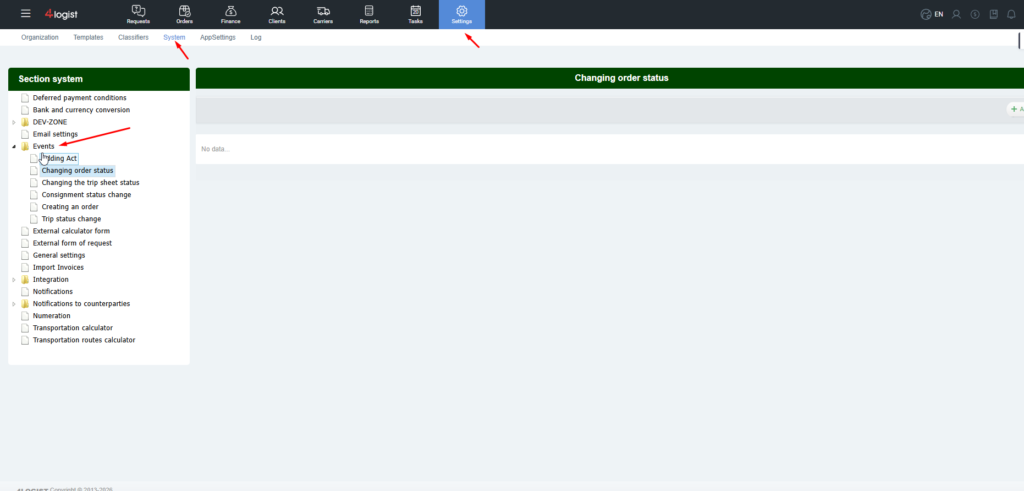
- Event Settings:
Here you can set up notifications for employees and contractors about system events, such as changes in the status of an order, cargo, or flight.
5. Key features of the notification system
- Notifications can be sent automatically or manually.
- Corporate mail is required for sending.
- Employee notifications are sent only to those who participate in the request, order, or flight.
- You can add employees ‘ email addresses to a copy of notifications sent to counterparties.
- Flexible configuration allows you to control notifications by event type, recipient role, and delivery channel (email / WhatsApp).
Was this helpful?
1 / 1