In the system, the financial logic of the order is built sequentially: from preliminary expectations for income – to the agreed rate with the client, then to the actual invoices and payments. The following describes what and at what stage is formed, and what each financial line in the order means.
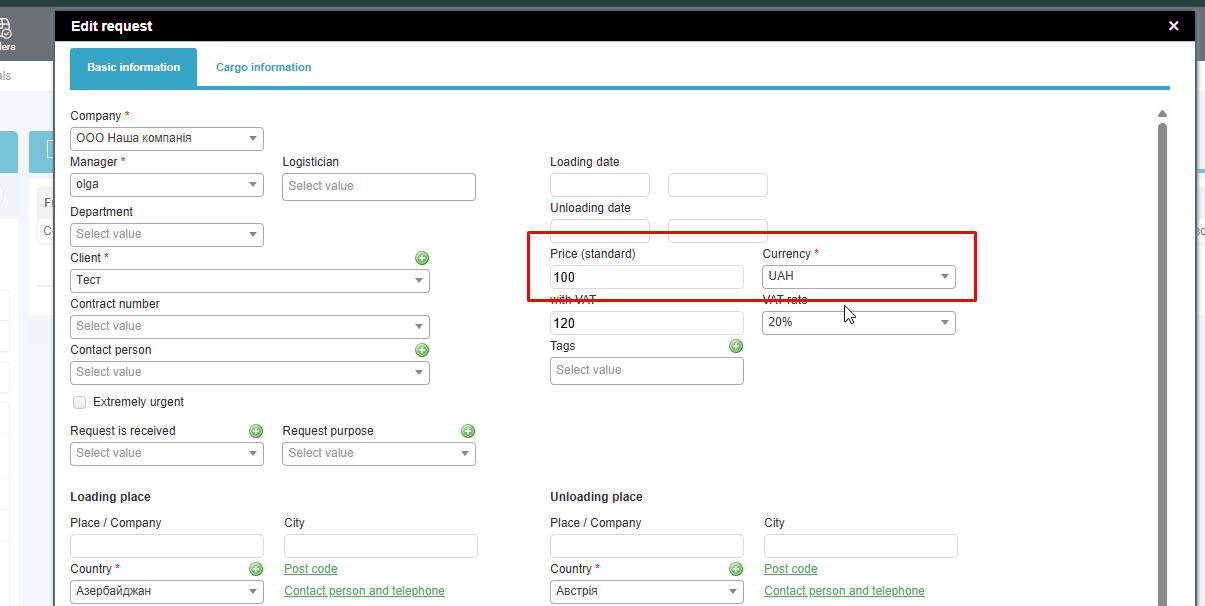
At the creation stage request You indicate the estimated price – the approximate amount that you plan to receive from the client for completing the request. At this stage, this is a preliminary estimate, without expense, and it is used solely to understand the expected income.
Next, when creating price offer, you are already fixing specific numbers:
- the carrier’s rate is the future expense;
- The price for the client is income if the work is done with this carrier.
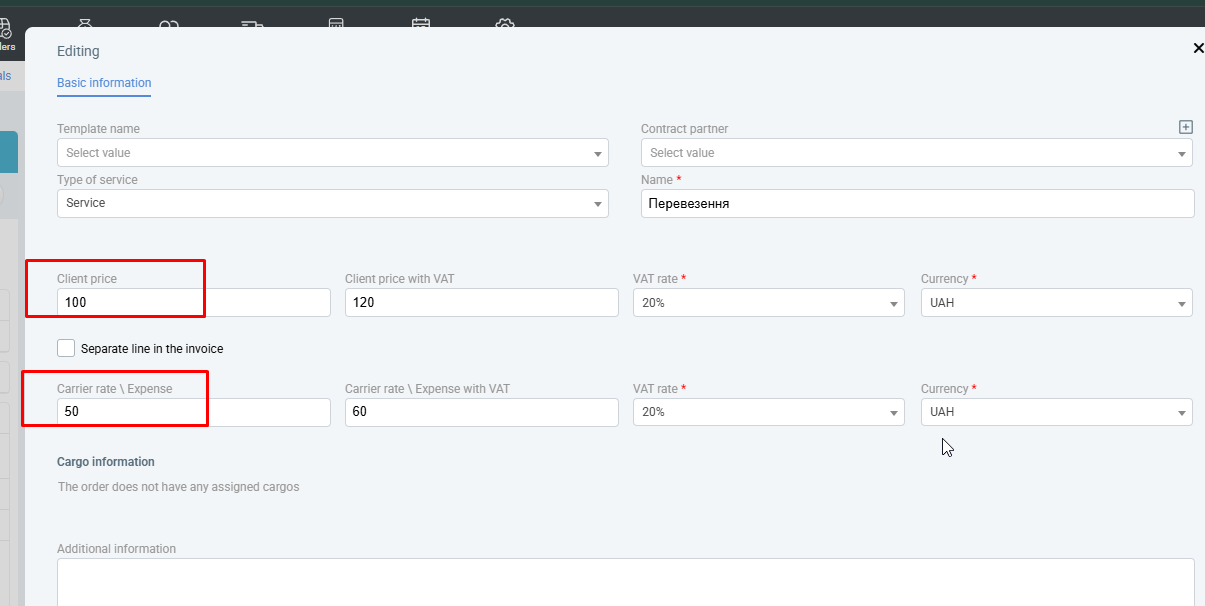
The price offer provides separate fields for this: one for the carrier rate (expense), the other for the price to the client (income).
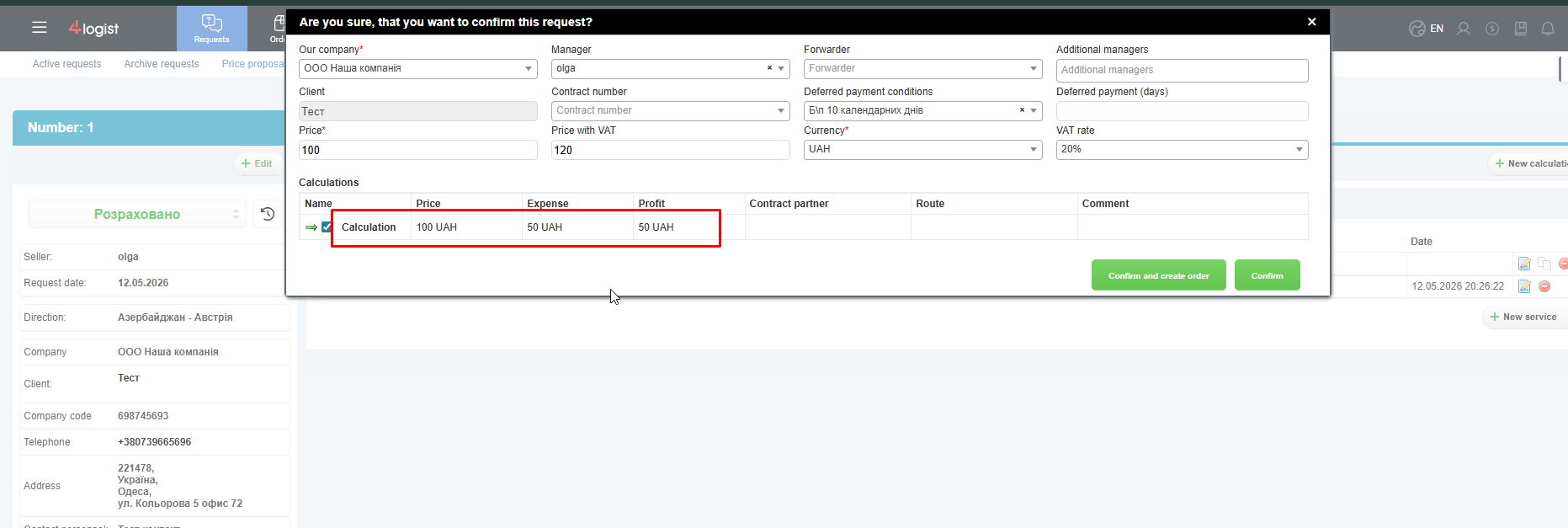
when the request is confirmed and based on it is created order, in the process of creating an order, you choose the desired price offer. After that, the data is automatically transferred:
- The price of the client from the price offer is transferred to the order as Initial rate;
- the carrier’s rate is transferred to the flight data as Carrier rate in order.
It is important to consider the fundamental point:
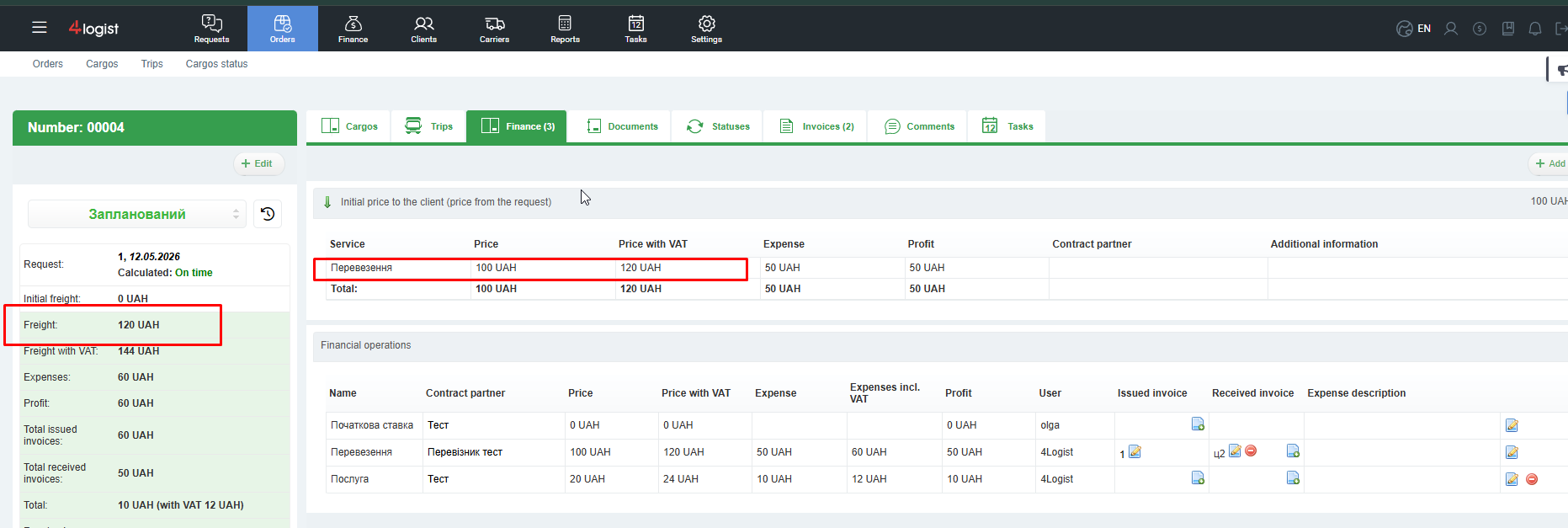
Initial rate – This is a fixed amount agreed with the client at the beginning of work. it is not subject to change. In the order it is displayed:
- in the ‘Finance’ tab;
- in the order itself as the initial rate.
The initial rate is the minimum amount that you are guaranteed to receive from the client for this order.
In this case, the total amount that the client will pay in fact is called freight.
Freight is the final composite price, which is formed on the basis of:
- initial rate;
- all additional income and expenditure financial transactions.
If, in addition to the main service (transportation, forwarding, etc.), additional services appear as part of the order, they are added in the tab ‘Finance’.
To do this, click the ‘Add’ button and create a financial transaction.
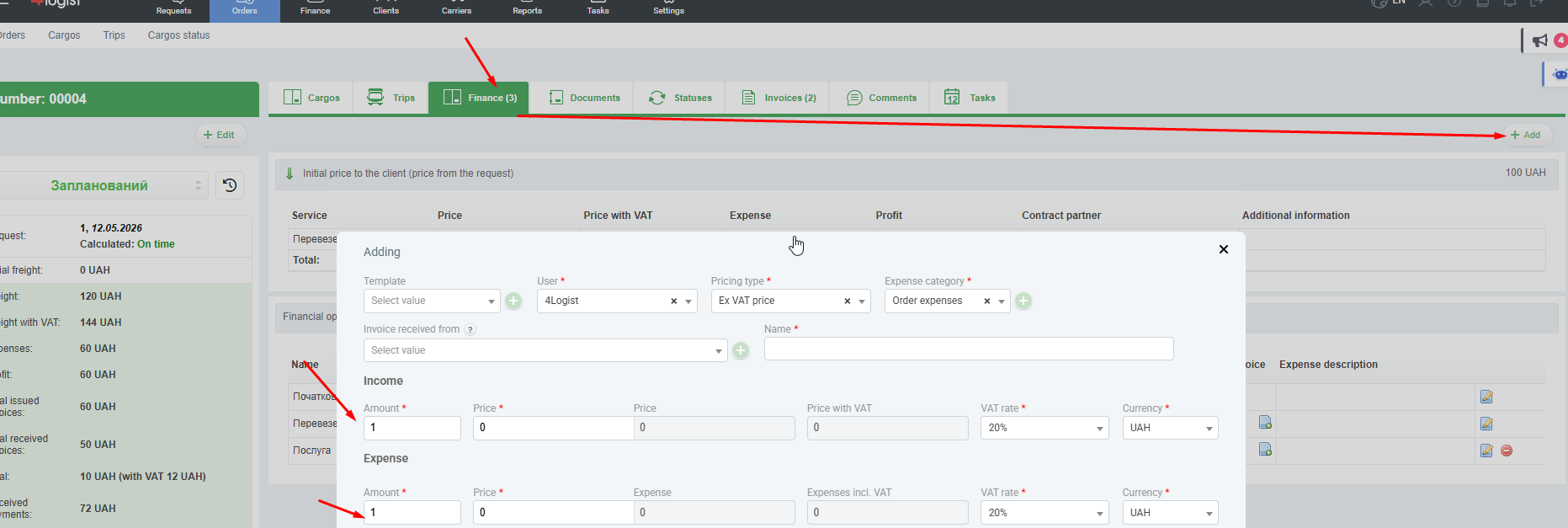
There are two types of financial transactions:
- Income – The amount that increases freight and will be set to the client for payment.
- Expence– the amount that your company pays to contractors; It reduces profits and is taken into account in order costs.
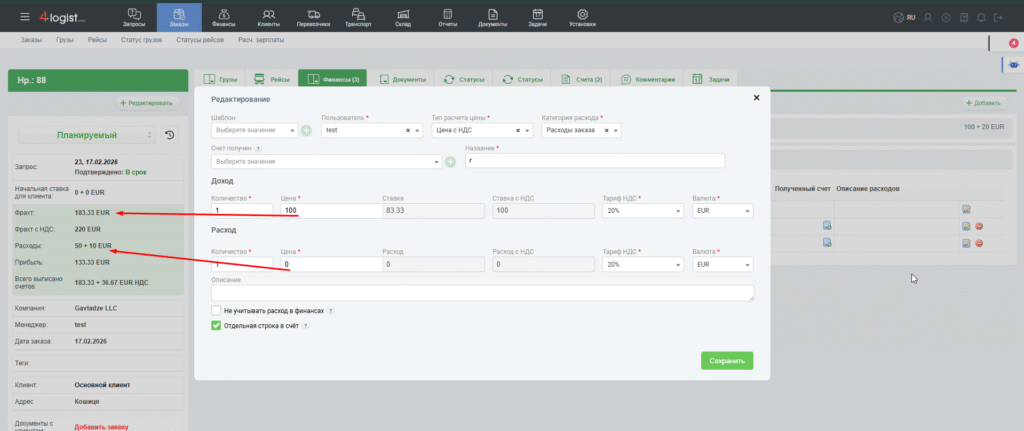
If you want the service to appear in the invoice as a separate line with its own name and description, you should set the flag ‘Separate line in the invoice’.
In this case, in the total display of the order, this amount:
- for income will be included in the line ‘Freight‘;
- for expenses – in the line ‘Expence‘.
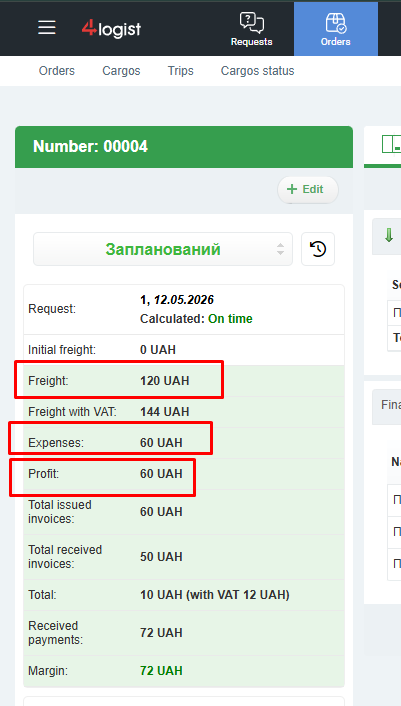
Profit on order Calculated automatically as the difference between:
- freight (all income, including the initial rate and additional income transactions);
- all expenses (carrier’s rate, flight costs, consolidation costs and all expenses).
This is the usual mathematical calculation: income minus expenses. 120 – 60 = 60
Next in the order appear Invoices – issued (to the client) and received (from contractors).
The system separately adds:
- the amount of the issued invoices;
- the amount of invoices received.
The difference between these amounts is displayed in the line ‘Total’.
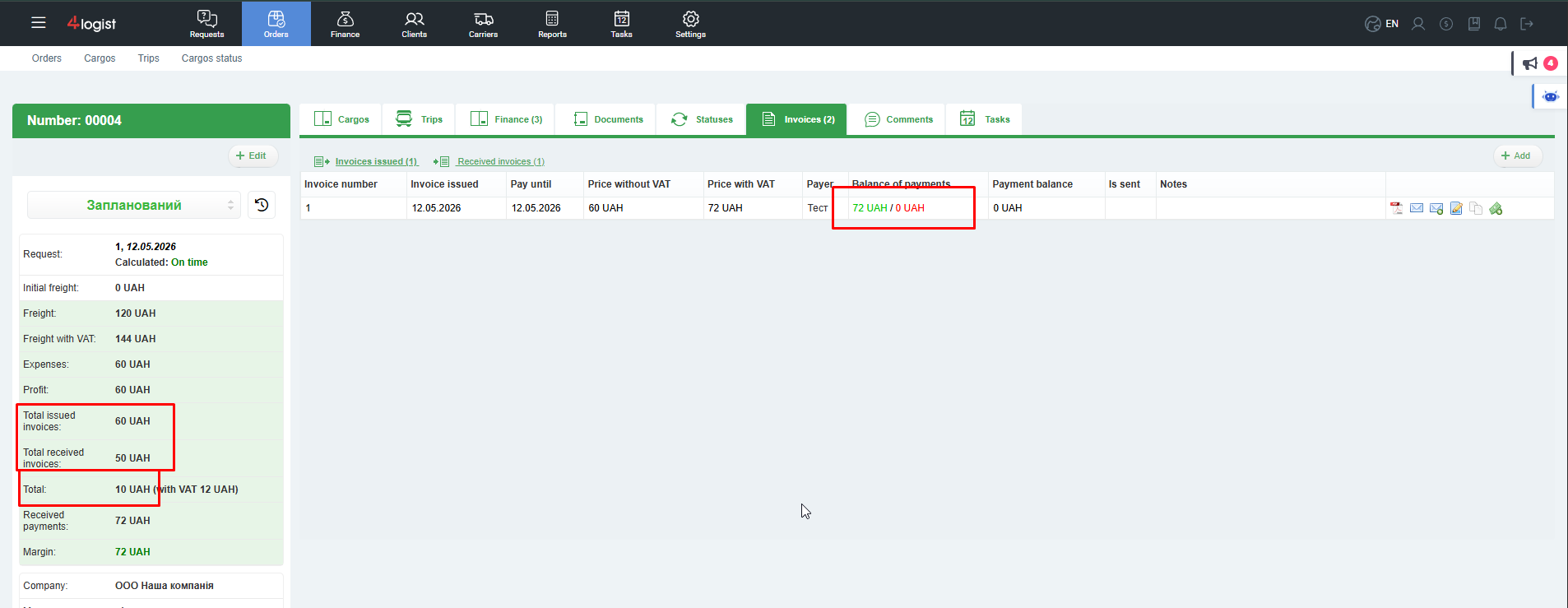
It is important to understand that the lines ‘Profit’ and ‘Total’ not directly related. Differences between them are possible and are a normal situation. They may occur for the following reasons:
- invoices are not issued for the full freight amount;
- The invoices received exceed the planned costs;
- different currencies and rates are used;
- The data in the order and data in the invoices were entered separately and may differ.
In the example, in the screenshot above, just the situation is: freight 120, and invoices issued for 60
Accordingly, the amount of profit and total – different. They can match if the invoices are correctly billed and the sum of the invoices is equal to the sum of freight and expenses.
Order and accounts are different levels of accounting: in the order you record planned and contractual data, and in the accounts – actual financial documents.
Next level – payments. Payments are always tied to invoices.
The system adds up:
- The amount of payments received – actually received money from customers;
- The amount of payments sent – actually paid amounts to contractors.
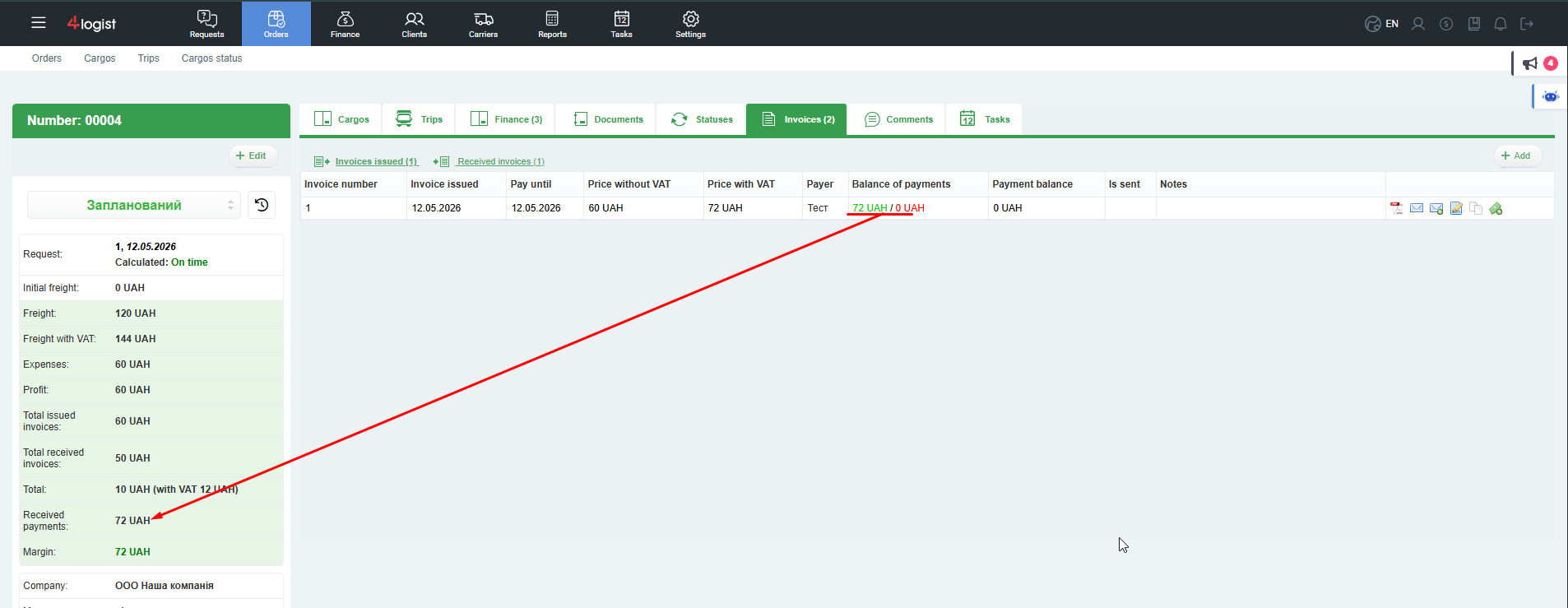
These amounts may not match the sums of accounts, as they are possible:
- partial payments;
- unpaid bills;
- exchange rate differences;
- payment in currency other than the currency of the account.
The difference between received and sent payments is displayed in the line ‘Margin’.
Margin only shows the movement of cash: how much money is actually received minus how much is actually paid. It is not directly related to freight, expenses or sums of accounts.
Thus, the discrepancy between the three indicators − Profit, in Total and Margin – Possible and explained by different levels of accounting (plan, documents, actual payments) and currency recalculations.
To analyze the order’s finances:
- A general brief summary display is available in summary in the left sidebar of the order;
- Detailed information is available on tabs ‘Finance’ and ‘Accounts’;
- In each account, you can click on the amount of the balance and see the history and amount of payments on a particular account.
There is no separate tab for payments – all payments are always tied to the corresponding accounts.
Was this helpful?
1 / 0